1. Product description
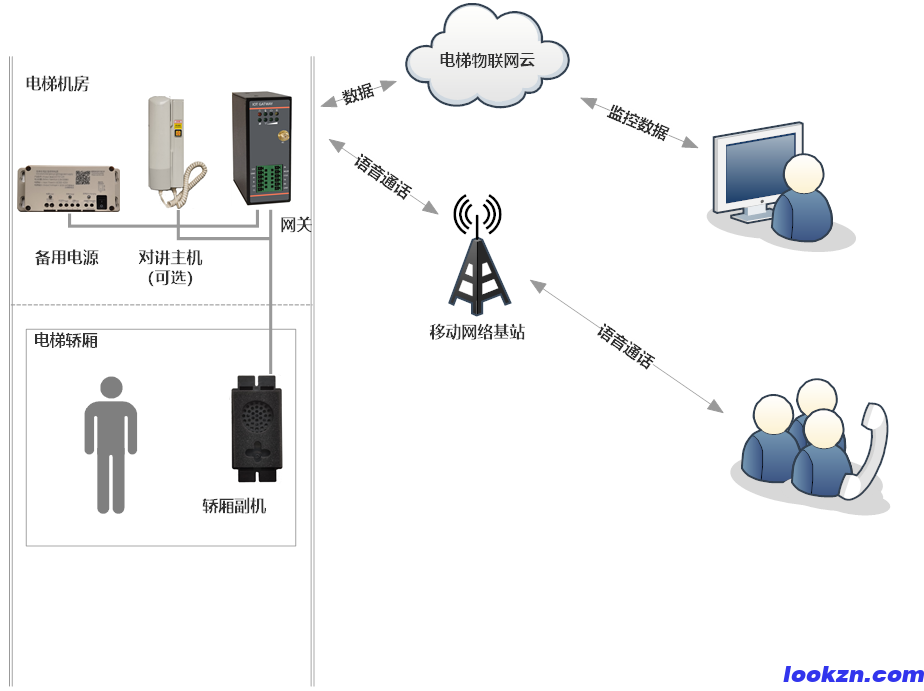
This product is a custom-developed elevator emergency rescue device for emergency rescue voice calls in case of an elevator crash.,
Not only can you call the emergency number, but it also has elevators.。
l Simplified
l The elevators are in the middle of the line.
l Actively alert rescue calls to support designated call (with SIM support))
l Elevator network functionality
2. Technical parameters
Categories | Specific parameters |
Mobile operators | All-Internet (mobile, connected, telecommunications)) |
Communication frequency | LTE-FDD:B1/B3/B5/B8 |
Network Delay | ≤500MS |
Elevator brand. | Support all elevator brands. |
Emergency rescue call. | Support mobile voice calls, voice calls, black and white lists |
Elevator Network | Support elevator remote state monitoring, failure alarm, statistics and remote management。 |
Five-way dialogue. | Compatible DeLux, Gbarng and the 4th Mainstream Five-Step |
Work voltage | 12V-24V DC |
Maximum Power | ≤ 5W |
Work temperature | -10℃ to +60℃ |
Work humidity | 10%-90%(No condensation) |
Installed | Host-guided track installation, co-located installation |
3、Interface Panel Description
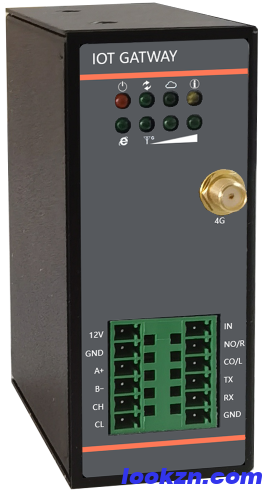
(1)Interface Definition
Interface Definition | Annotations |
Power supply | 12V-24V DC(If you have access to the five-party dialogue, you must match the five-party talk system with the power pressure to avoid burning the five-party talk system.)。 |
RS485 | Reconcile elevator system supporting RS485 interface, Porter Rate≤115200,Half-dual.。 |
CAN | Connecting elevator systems that support the CAN bus interface, Porter Rate≤100k。(Optional) |
| RS232 | Reconciliation of elevator system supporting RS232 interface, Port rate≤115200。Full double. (Optional)) |
Switch weight | Support for 1 input, 1 output (dry points))。 |
| Voice-over. | Joins the R, L, end of the five-party intercom system. (Share interface with switch volume, function one.))。 |
(2)LEDSignal light definition
LEDSignal light | Annotations |
Power Directives | Constant light: Power supply is normal。 |
Active status indicator | Quick scintillation: system is starting or upgrading。 1Second flash: system is working.。 |
Cloud Connection State | Constant light: Cloud connection is normal。 |
- Bad warning. | Light: No SIM card or SIM abnormal。 1 second off: system connected to elevator system failed。 |
Mobile Network Status | Slow flash: Connecting to mobile network。 Constant light: mobile network connection successfully。 Brightness: Network data interactive。 |
Move signal strength | Full Extinction: No signal。 Lights on 1: bad signal quality, poor data communications, easy to delineate。 Lights: medium signal quality, data communications are good。 Full Light: good signal quality, data communication normal, no delay。 |
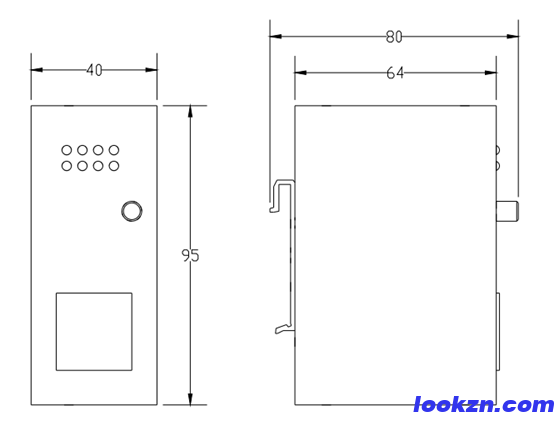
4. Install Size
Specific installation dimensions requirements (in units):mm):
5. Install debug
l Confirm check: confirm correct five-to-one connection, correct power voltage, good 4G antenna connection, SIM card inserted。
l On-board start: see if the lights are normal. Normally running, signal strength is normal, cloud connection lights are on.。
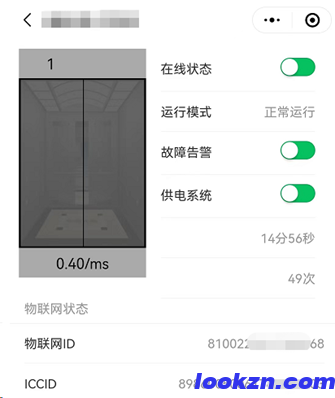
l Device binding: login using micro-mail applet->Clean it up.->Select elevators for binding ( elevator files need to be established in elevator network cloud))。
l Observation test: access to the small-programme elevator->Real-time state, live operation of elevators, observation of the actual status of the small-scale elevators.。
If you open the door, you run the direction, you run the mode, etc.。
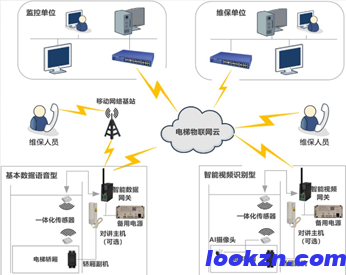
6. Typical application programmes